Back office
Expense tracker with receipt scanning for tradesmen
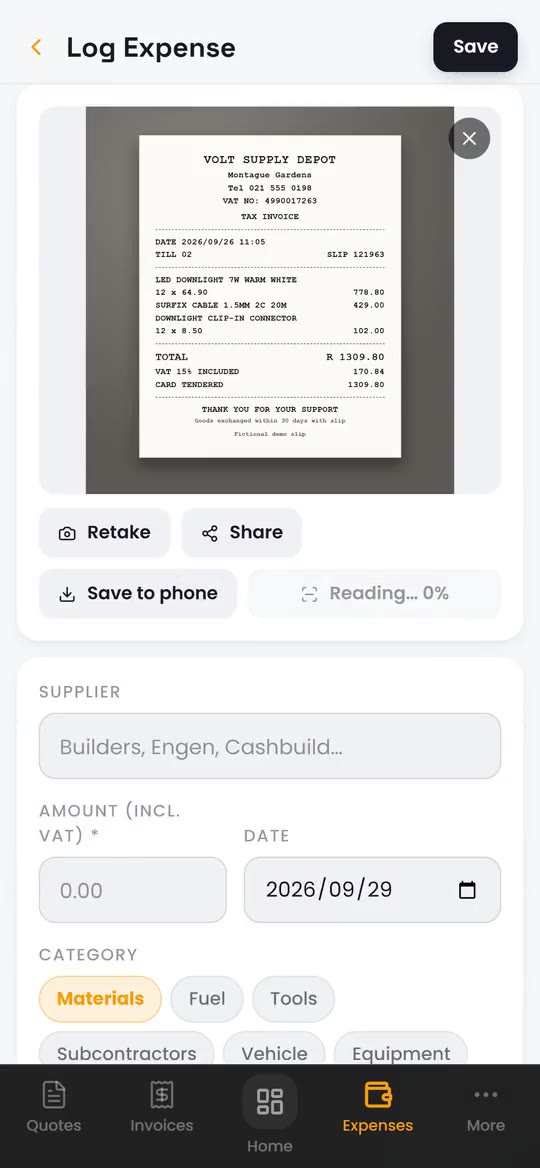
BlitzBooks tracks your business expenses from a photo of the till slip. Take the photo, tap Scan slip and it reads the supplier, amount, date and VAT number where it can, then you check and save. VAT at 15% is split out for you, and the photo stays with the expense as your proof for SARS.
How it works in the app
- Step 1
Snap the slip
Tap Log, then Take Photo, or pick a photo from your gallery.
- Step 2
Scan it
Tap Scan slip. Empty fields fill in from the slip, and anything it is unsure of is highlighted for you to check. If it cannot read the slip, type the details in.
- Step 3
Pick a category and save
Materials, fuel, tools and more, or your own categories. Turn on I have a valid tax invoice to claim the VAT.
The details that matter
-
VAT split for you
Enter the amount including VAT and the 15% is split out, showing the net amount and the VAT to claim.
-
Only claimable VAT counts
Slips without a valid tax invoice are kept, but their VAT is left out of your VAT report.
-
Knows where tradesmen shop
It recognises the big South African builders' merchants and fuel stations and suggests the category.
-
Job costing
Link an expense to an invoice to see what that job really cost you.
Read the guide: VAT for Tradesmen in South Africa

“My life is so much easier. Almost zero admin now.”
Questions about expenses & receipts
Does the receipt scanner always work?
No. It reads clear, flat slips best. If a slip is faded, creased or blurry it fills nothing, and you type the details in yourself.
Do I need a photo for every expense?
No, the photo is optional. Keeping one is sensible, because the slip is your proof if SARS asks.
Can I claim VAT on my expenses?
Yes, if you are VAT registered and the slip is a valid tax invoice. BlitzBooks adds that VAT to the input side of your VAT report. Our guide to VAT for tradesmen explains the rules.
Where is my slip read?
On your own phone. The first scan downloads the reader once, about 7 MB. The photo is then stored with the expense in your account so you can find it later.
What about rent, wages and other fixed costs?
Add them once under Recurring and Wages, weekly, monthly or yearly. They count towards your profit in Insights, and any VAT on them counts in your VAT report.
Works well with
Stop doing admin at 9pm.
Quote on site, invoice before you pack up, and see who owes you on one screen. 7 days free, then R200 a month for the whole business.
Card to start · nothing charged for 7 days · cancel in Settings

 Trusted by tradesmen across South Africa