Winning work
How to get more Google reviews as a tradesman
To get more Google reviews as a tradesman, ask every customer when the job is finished, and make leaving one a single tap or scan with your Google review link or QR code. Reply to the reviews you get. Google says more reviews and positive ratings can help your local ranking, but never pay or reward anyone for one.
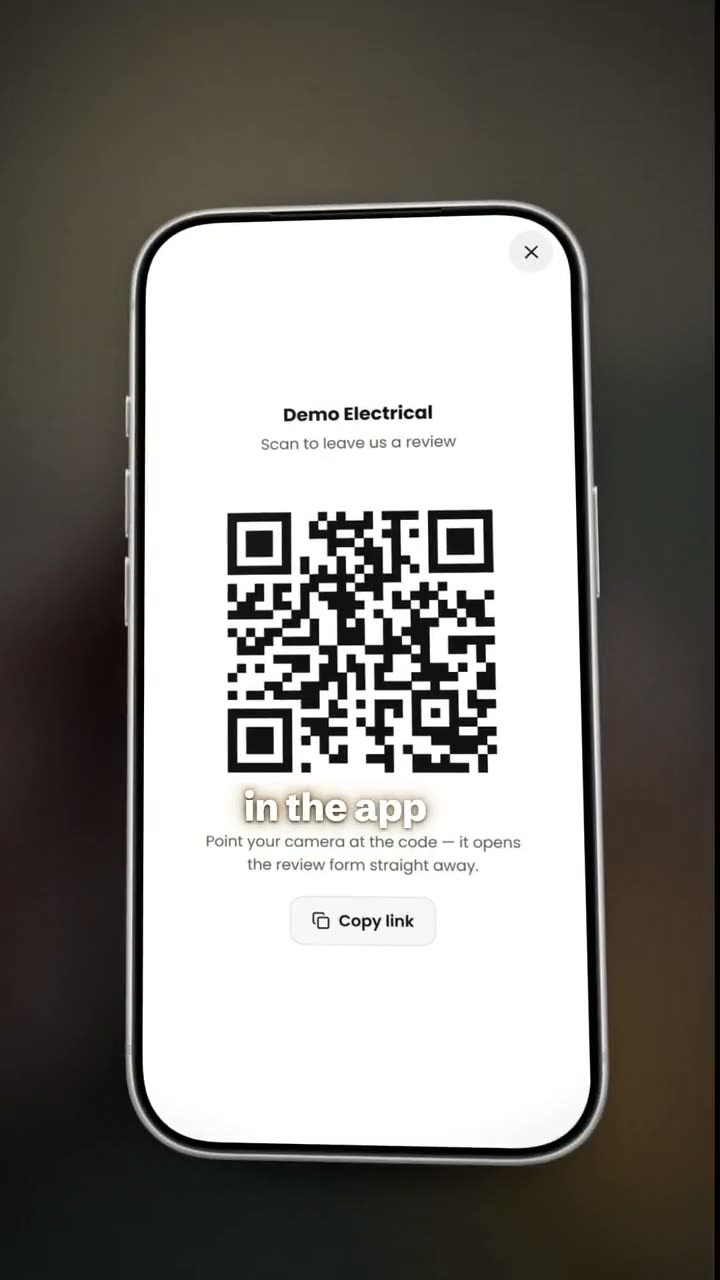
Step by step
- 1
Get your review link from Google
Open your Google Business Profile, tap Ask for reviews and copy the link Google gives you. This link opens your review form directly, so the customer does not have to search for your business.
- 2
Paste it into BlitzBooks
In Settings, open Google Reviews and paste the link into Your Google review link. BlitzBooks shows the QR code so you can test it. If the link is not a usable web address, no QR prints and Settings tells you what to fix.
- 3
Send your invoices as normal
Every invoice now prints a box at the bottom: "Happy with the job? Scan to leave us a review." with the QR code and "Tap/click to review". On paper the customer scans it. On the PDF the whole box is a link, so they can tap it on their phone or click it on a laptop.
- 4
Ask in person at the end of the job
Tap More, then Review QR. The code fills your screen on a white background, so a customer standing with you can scan it off your phone. Ask, and leave it there if they say not now.
- 5
Send the link on WhatsApp
On the Review QR screen, tap Copy link and paste it into the customer's chat with a short thank-you. A link in the chat they already use is one tap away.
- 6
Reply to every review
Thank the customer by name and mention the job. Reply to a poor review calmly, with the facts and, where it is due, an apology.
Do Google reviews help a tradesman get found?
Yes, Google says they can. Google's own help page on local ranking states: "More reviews and positive ratings can help your business's local ranking." (Google Business Profile Help, checked 12 October 2026). Reviews are also what a homeowner reads on Google Maps before they phone a plumber, electrician or builder they have never used.
When is the best time to ask for a Google review?
Ask when the job is finished and the customer can see the work, which is usually when the invoice arrives. The result is in front of them and the details are fresh, so a review takes them a minute.
Ask every customer the same way, not only the ones you expect to be pleased. Google's policy forbids businesses to "selectively solicit positive reviews from customers". A review request printed on every invoice treats every customer the same.
Can I offer a discount for a Google review?
No, Google does not allow a business to offer a discount or any other reward for a review. Its policy prohibits reviews posted because a business offered an incentive "such as payment, discounts, free goods and/or services". Google's policy also forbids discouraging negative reviews and says merchants should not pressure customers to leave a review while on the premises (Maps user-generated content policy, checked 12 October 2026).
Breaking these rules puts your reviews, and your profile, at risk. Ask clearly, make it easy, and let the customer decide.
How should I reply to Google reviews?
Reply briefly, personally and honestly. Google's tips are to keep replies short, avoid generic thank-yous, stay friendly rather than selling, sign replies personally and respond promptly (Tips to get more reviews, checked 12 October 2026).
For a negative review, never share the customer's private details and never attack the reviewer. Google notes that "A genuine apology can go a long way in rebuilding trust." Other customers read your reply as much as the review.
Questions
Where do I find my Google review link?
In your Google Business Profile. Tap Ask for reviews and copy the link Google gives you. Paste it into BlitzBooks under Settings, Google Reviews, and it prints as a QR code on every invoice.
Can I ask only my happy customers for a review?
No. Google's policy forbids selectively asking for positive reviews. Ask every customer the same way. A review box on every invoice does that without you choosing who sees it.
Does the review QR code go on quotations?
No. BlitzBooks prints it on invoices only, because a customer can only judge the work once it is done.
Does the customer need a Google account to leave a review?
Yes. Google says a customer needs a Google Account to post a review, and they can set one up with an email address that is not Gmail.
Do I need a Google Business Profile?
Yes. The review link and QR code send customers to your Google review form, so you need a Google Business Profile first. Without a link set, BlitzBooks invoices print as normal with no review box.
Do it on your phone, today.
Quote on site, invoice before you pack up, and see who owes you on one screen. 7 days free, then R200 a month for the whole business.
Card to start · nothing charged for 7 days · cancel in Settings
 Trusted by tradesmen across South Africa