Getting paid
How to send an invoice or quotation on WhatsApp
To send an invoice or quotation on WhatsApp, save it as a PDF, then attach it to the customer's chat as a document, or share the PDF straight from your invoicing app and pick WhatsApp. A PDF keeps your layout, totals and banking details intact, and the customer can save it or forward it to whoever pays.
Step by step
- 1
Save the customer's mobile number
Type it in the Contact / WhatsApp field on the quotation, or in Mobile (WhatsApp) on the client's page. Type it the way you always do, like 082 000 0000. BlitzBooks stores it with +27 so WhatsApp can find the number.
- 2
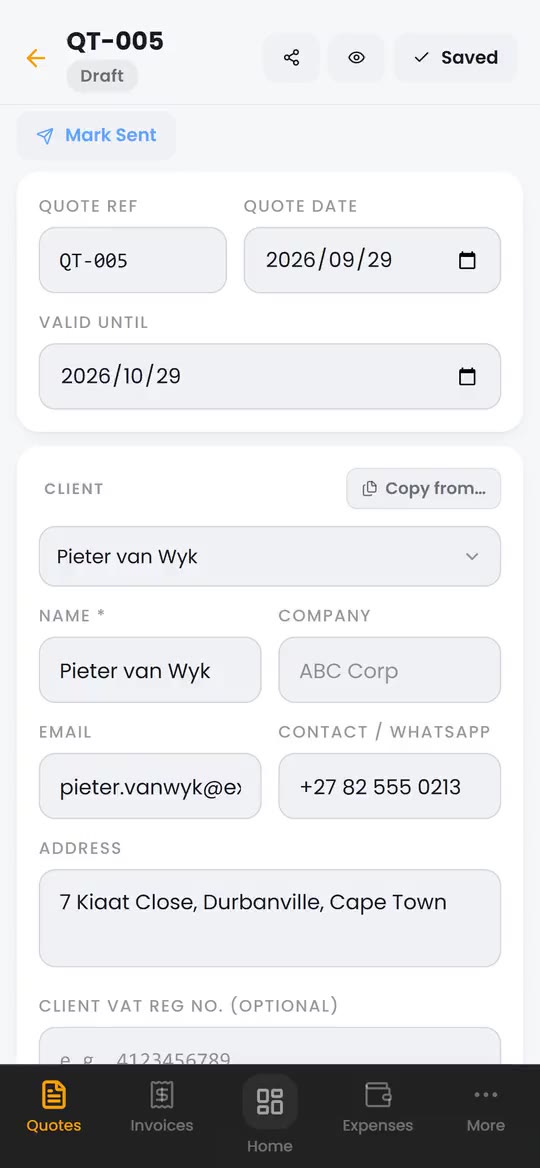
Save the quotation or invoice
Tap Create. The share icon appears at the top once the document is saved.
- 3
Open the share sheet
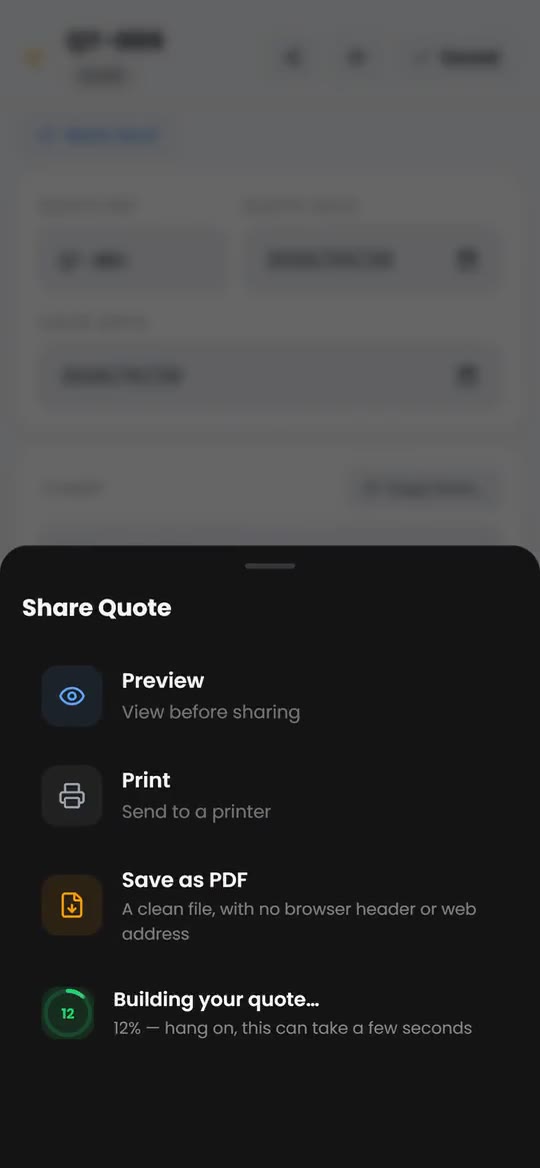
Tap the share icon. You get Preview, Print, Save as PDF and Share. Tap Preview first if you want to check the PDF.
- 4
Build the PDF
Tap Share. A dial shows the progress while the PDF is built, which can take a few seconds.
- 5
Pick WhatsApp and the chat
When it says PDF ready, tap again. Your phone's share sheet opens. Pick WhatsApp, then the customer's chat, and send. The file arrives named after the document, such as QT-005.pdf.
- 6
Add a line and mark it sent
Type a short message in the chat so the customer knows what the PDF is. Back in BlitzBooks, tap Mark Sent on a quotation or Mark as Sent on an invoice.
Why send a PDF instead of a screenshot?
A PDF is the actual document, not a picture of it. The customer can zoom in on every line, save it, print it and forward it to an accounts department, and the VAT figures and banking details stay readable. A screenshot gets cropped and compressed, and it rarely looks like it came from a business.
What should the WhatsApp message say?
Say what the document is, what you need from the customer, and by when. Keep it to two or three lines and use their name. Copy and change these:
Quotation: "Hi Pieter, here is your quotation QT-005 for the DB board upgrade. It is valid for 30 days. Let me know if you have any questions, and reply here to go ahead."
Invoice: "Hi Pieter, thanks for having us. Here is invoice INV-007 for the work done today. Our banking details are at the bottom. Please use INV-007 as the payment reference."
Deposit: "Hi Pieter, here is your invoice for the 50% deposit. As soon as it reflects we will order the materials and confirm your start date."
Need to follow up an unpaid invoice? Our guide to chasing a late-paying customer covers what to say and when.
How do I send an invoice on WhatsApp from a computer?
Save the invoice as a PDF, then attach it in WhatsApp Web or the WhatsApp desktop app. In the chat, tap the attach button, choose Document and pick the file.
In BlitzBooks on a computer, Save as PDF gives a clean file with no browser header, date stamp or web address on it. If your browser cannot hand the file to another app, BlitzBooks saves the PDF to your Downloads folder and tells you to attach it from there.
Questions
Does BlitzBooks send WhatsApp messages for me?
No. BlitzBooks builds the PDF and hands it to your phone's share sheet. You pick the chat and press send, so the customer sees it come from your number, in the chat you already have with them.
Can I use WhatsApp Business?
Yes. Your phone's share sheet lists the WhatsApp apps you have installed, and you pick the one you use. BlitzBooks does not connect to the WhatsApp Business API and does not send anything on its own.
Why does BlitzBooks need two taps?
Because phones only let an app open the share sheet straight after a tap. The first tap builds the PDF, and the second hands it to WhatsApp while that tap is still fresh.
What if my phone will not share the PDF?
BlitzBooks gives it one more try on your next tap, then saves the PDF to your Downloads and tells you what to do. In WhatsApp, tap the attach button, choose Document and pick the PDF from Downloads.
Can I tell if the customer opened the PDF?
Not from BlitzBooks. It does not track whether a customer opened a document. Mark the quotation or invoice sent yourself, and follow up in the chat if you hear nothing.
Do it on your phone, today.
Quote on site, invoice before you pack up, and see who owes you on one screen. 7 days free, then R200 a month for the whole business.
Card to start · nothing charged for 7 days · cancel in Settings


 Trusted by tradesmen across South Africa