Send it from site
Send quotations and invoices on WhatsApp
BlitzBooks turns every quotation and invoice into a clean PDF you send on WhatsApp from your phone. Tap Share and wait a few seconds while the PDF is built, then tap again and pick WhatsApp and the customer's chat. Statements, pro formas, job cards and reports share the same way, and so does email.
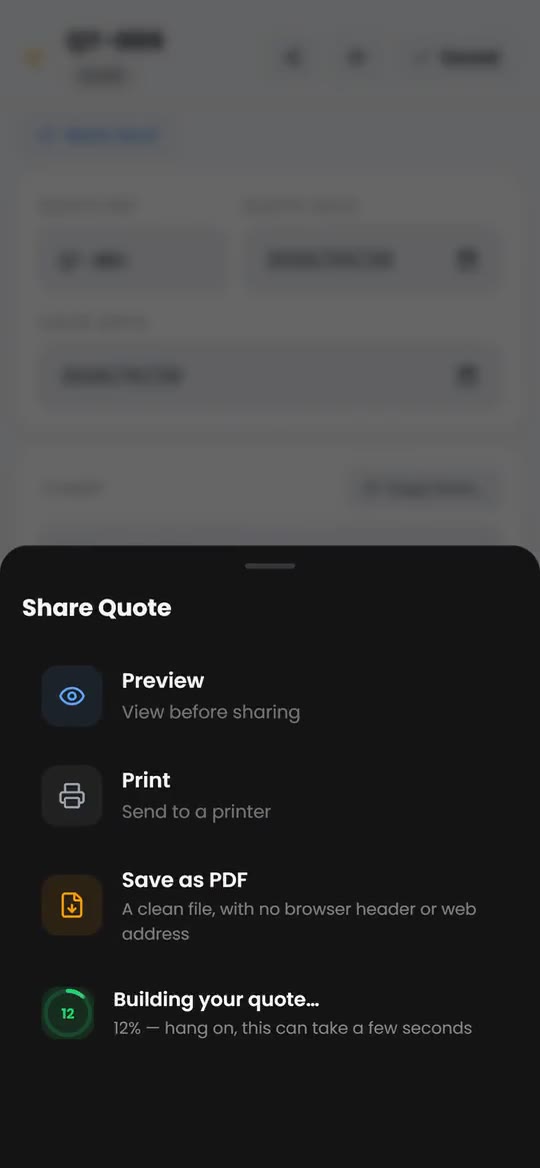
How it works in the app
- Step 1
Open the share sheet
On a saved quotation or invoice, tap the share icon. You get Preview, Print, Save as PDF and Share.
- Step 2
Build the PDF
Tap Share. A dial shows progress while the PDF is built, which can take a few seconds.
- Step 3
Pick WhatsApp
When it says PDF ready, tap again. Your phone's share sheet opens: pick WhatsApp, then the customer's chat.
The details that matter
-
A real PDF, not a screenshot
The customer gets a PDF file with your branding, ready to save or forward to whoever pays the bills.
-
Nothing on the page but yours
Save as PDF gives a clean file with no browser header, date stamp or web address on it.
-
Every document, the same way
Quotations, invoices, pro formas, statements, job cards and reports all share from the same sheet.
-
Straight to their chat
Each client's page has WhatsApp, Call and Email buttons. Save their mobile number once and WhatsApp opens a chat with them.

“I quote from the bakkie now. The invoice is sent before I have packed up the tools.”
Questions about whatsapp sending
How do I send an invoice on WhatsApp from BlitzBooks?
Open the invoice, tap the share icon, then Share. When it shows PDF ready, tap again, pick WhatsApp on your phone's share sheet and choose the customer's chat. The invoice arrives as a PDF.
Why does it take two taps?
Because phones only let an app open the share sheet straight after a tap. The first tap builds the PDF, and the second hands it to WhatsApp while that tap is still fresh.
What if my browser will not share the file?
BlitzBooks gives it one more try, then saves the PDF to your Downloads and tells you what to do. In WhatsApp, attach it as a document from there.
Can I email the PDF instead?
Yes. The share sheet offers whatever apps your phone has, email included. On a computer, use Save as PDF and attach the file to your email.
Does BlitzBooks send WhatsApp messages for me?
No. You send the PDF from your own WhatsApp, so the customer sees it come from your number, in the chat you already have with them.
Works well with
Stop doing admin at 9pm.
Quote on site, invoice before you pack up, and see who owes you on one screen. 7 days free, then R200 a month for the whole business.
Card to start · nothing charged for 7 days · cancel in Settings

 Trusted by tradesmen across South Africa